Capture once.
Publish four ways.
worksnip rides along in Chrome while you work, learns what you meant to teach, and turns it into a walkthrough, a brief, a reel, and a skim — in your team's voice, in any language, from one capture.
Pay per guide — $1 written · $2 voiced · $5 premium · bundled into plans from $19/mo.
From the team behind
"Trainings, demos, onboarding, the how-to that comes up in chat — all worksnips now. We stopped editing them, and the team stopped re-asking the same questions."
— Sara M., Functional Consultant · Munich
Part of the BDP suite — connected tools for B2B teams
See it run
Sixty-three seconds, start to finish.
Press record, do the job, and the guide is already written — then read it four ways, share it, and let the Assistant explain the screen.
One capture turns into everything you need to teach it.
Click through your workflow once. worksnip handles the writing, the voice, the visuals, and the publishing — so you stop re-recording and start shipping.
A side panel that
keeps up.
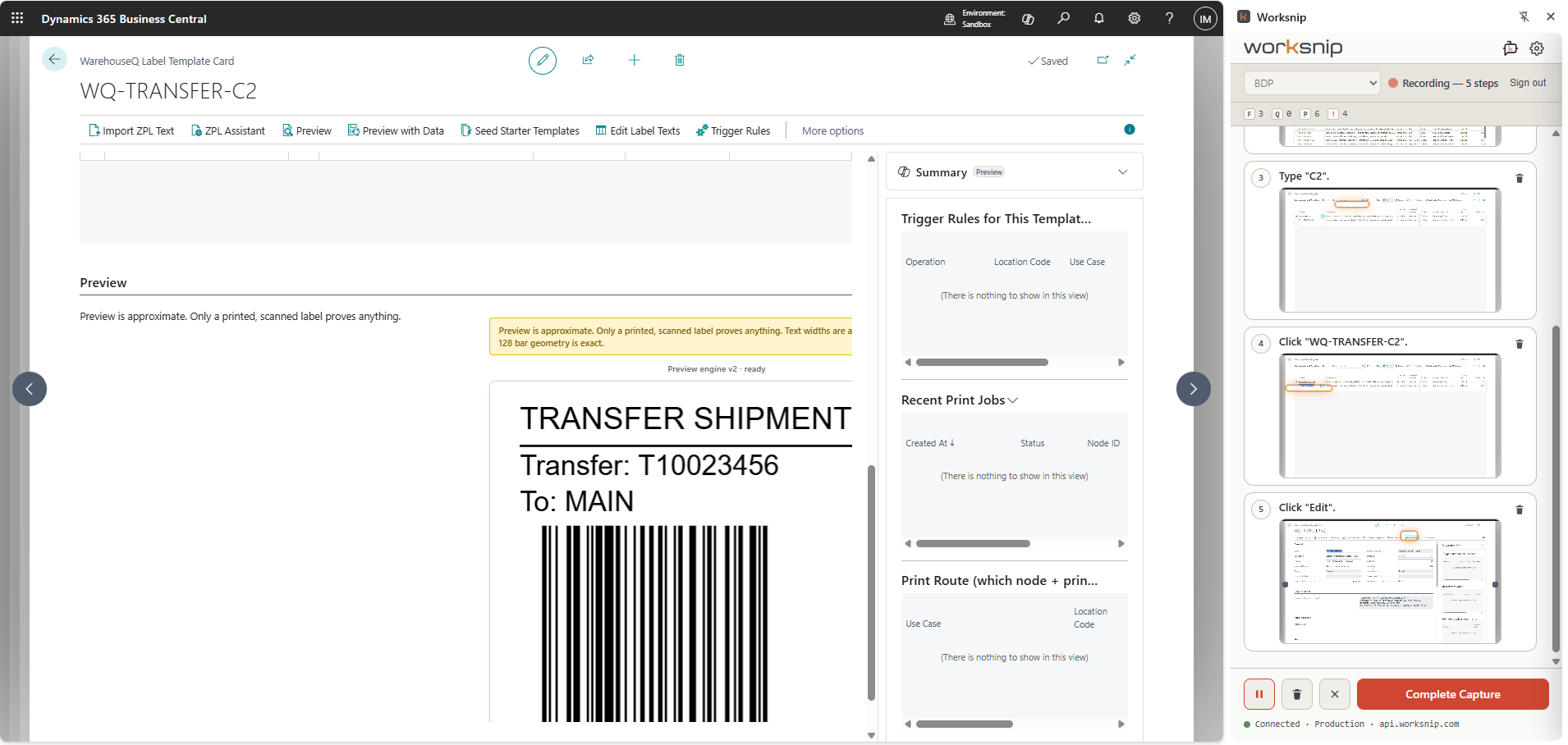
Pin worksnip to Chrome's side panel and work as you normally would. It watches every click, key, and tab change — and stays out of the way until you're done.
See the extension →Narration that
sounds senior.
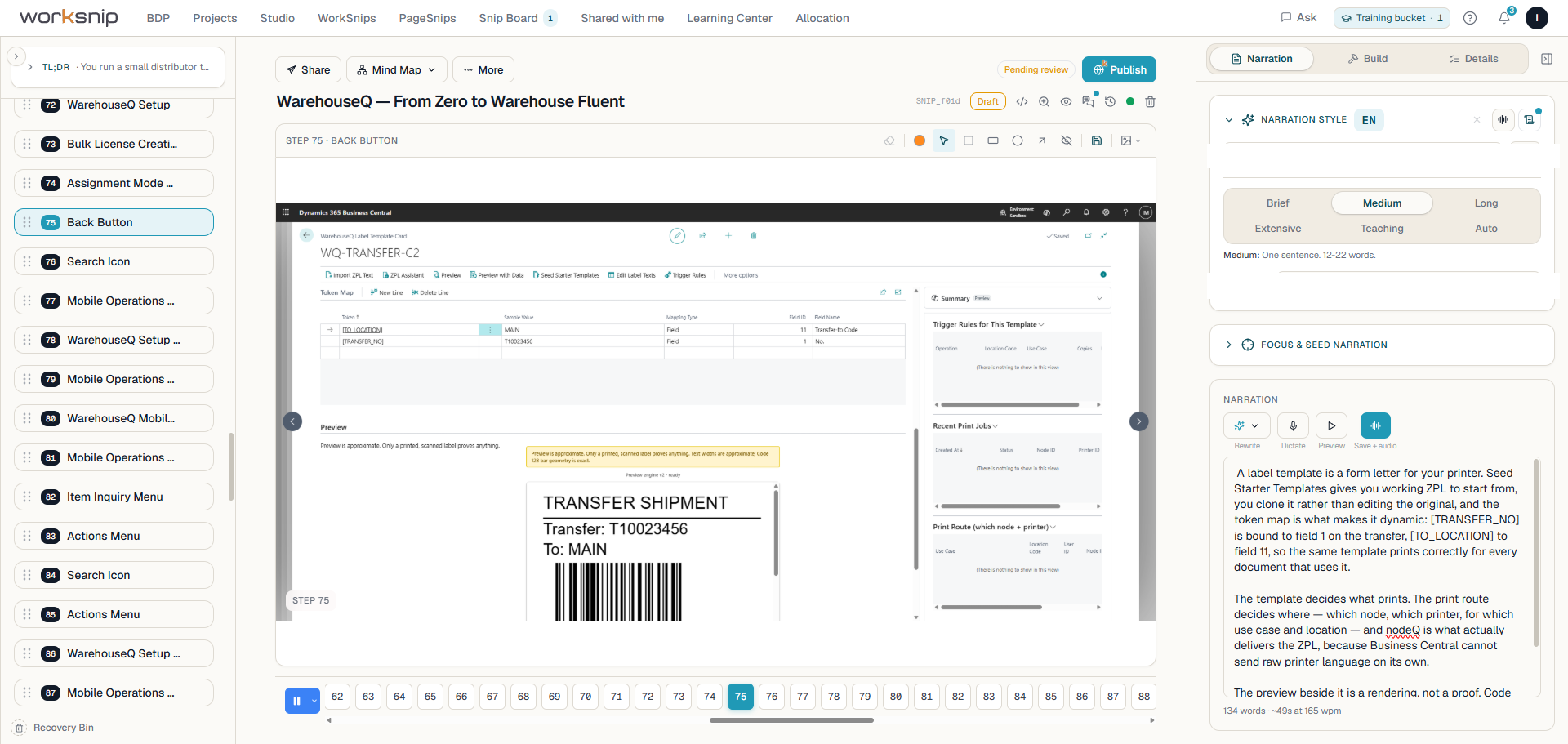
A click becomes "select the customer Acme Corp" — not "click the dropdown." worksnip reads the workflow's intent first, then writes each step against that intent. In any of 30+ languages.
Voices & languages →One link.
Four ways to read.
Send the same guide to a learner, a reader, an observer, and a skimmer. They each get the layout that suits them — without you re-publishing four times.
See the four modes →If you can open it
in Chrome, you can
worksnip it.
The capture engine doesn't care what app you're teaching. CRM, ERP, helpdesk, your own internal tool — point the side panel at it and you're recording. For the platforms our customers train most, we ship deeper packs.
Deeper training where you live the most.
Packs add platform-aware narration — the AI knows your modules, your vocabulary, your screens. Pick one, or ask us to build yours.
The real thing
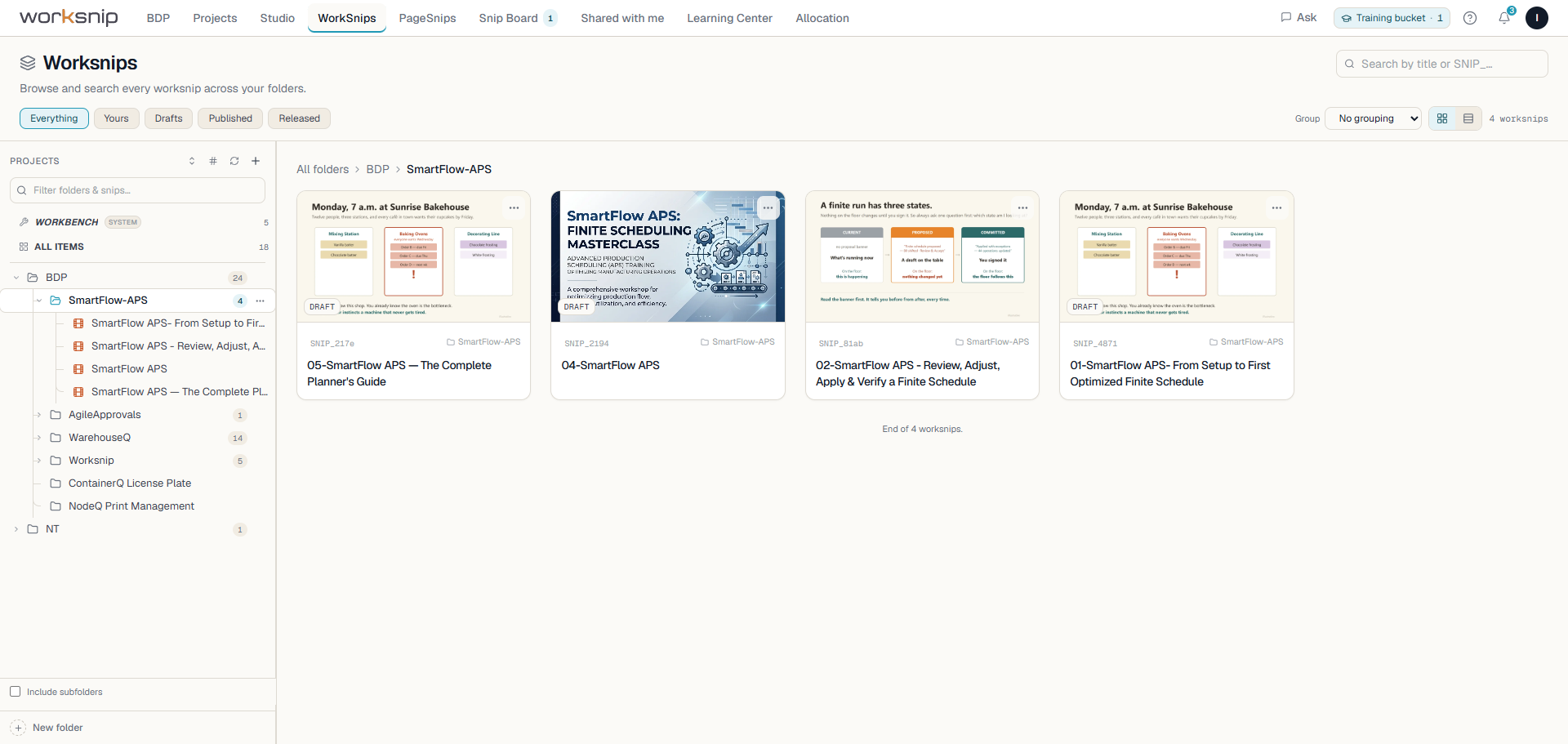
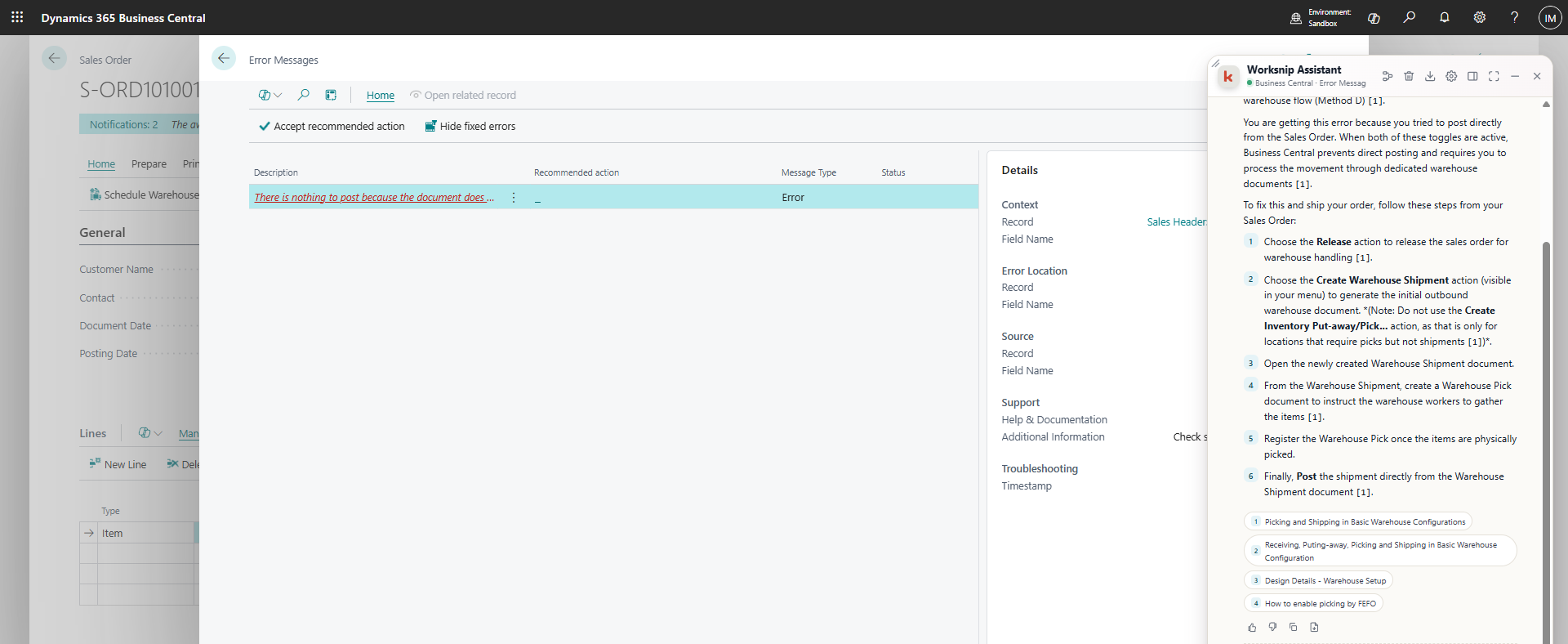
Not a mockup. The product, mid-job.
Every screen below is a live capture — the same guide, followed from the click that recorded it to the link you hand someone.
Four reading modes
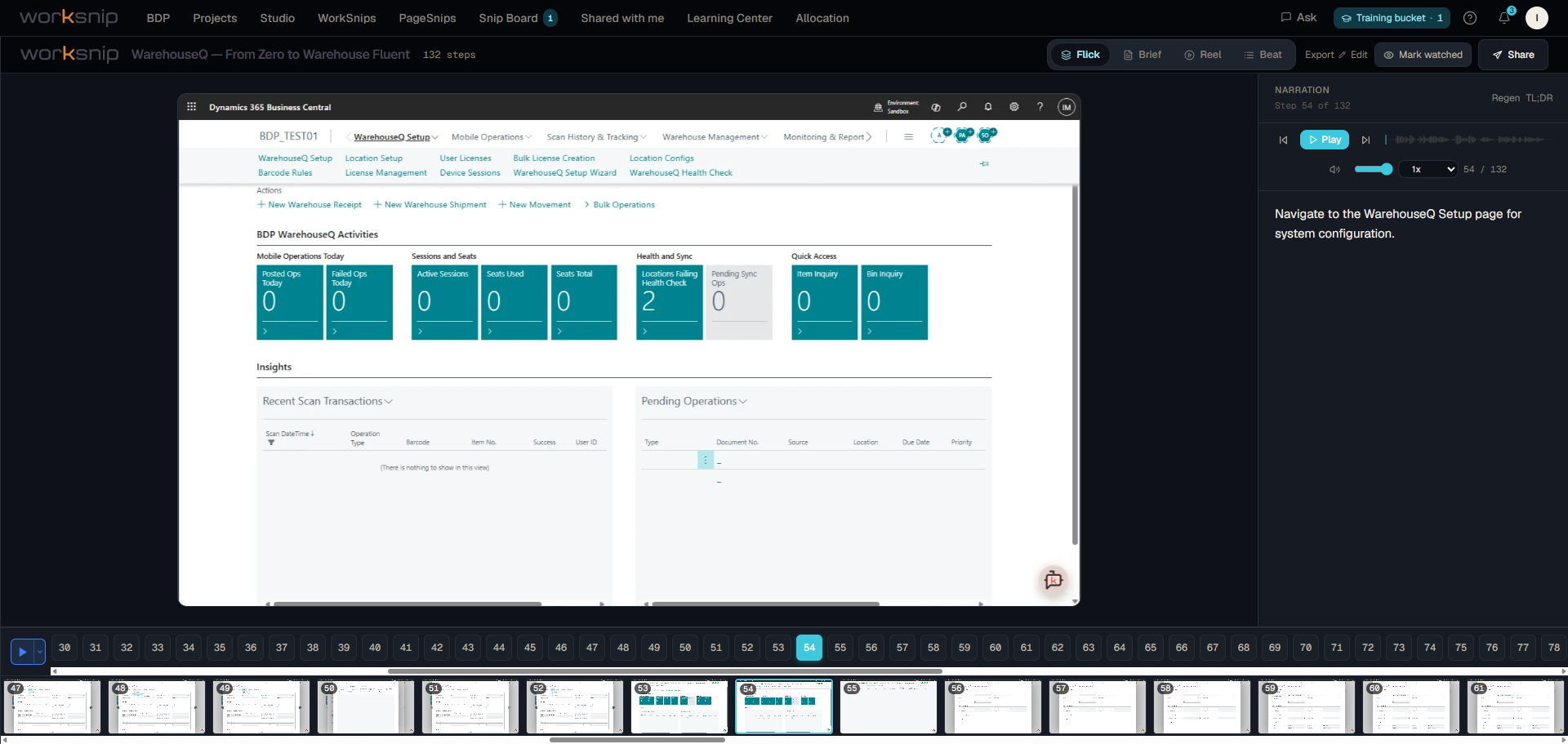
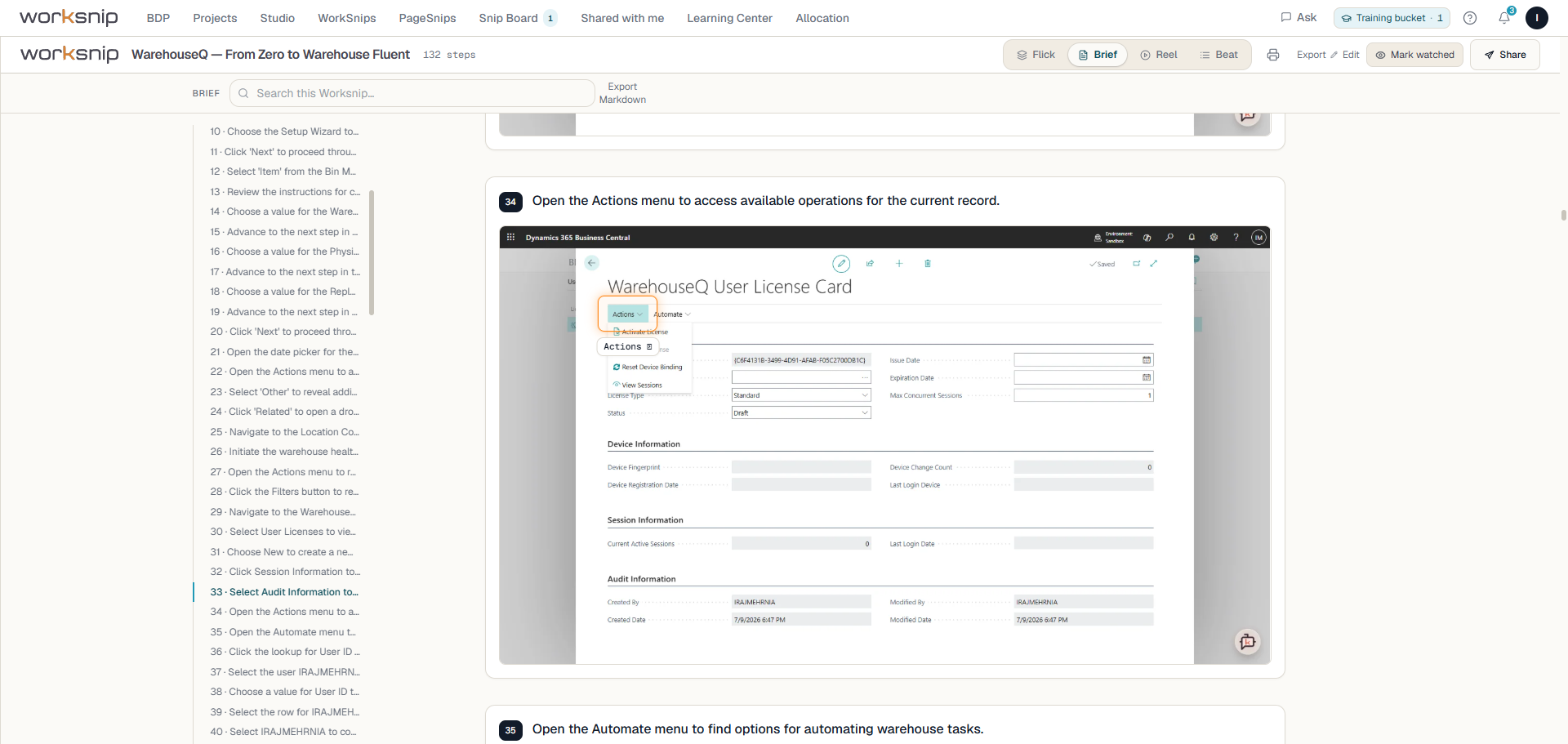
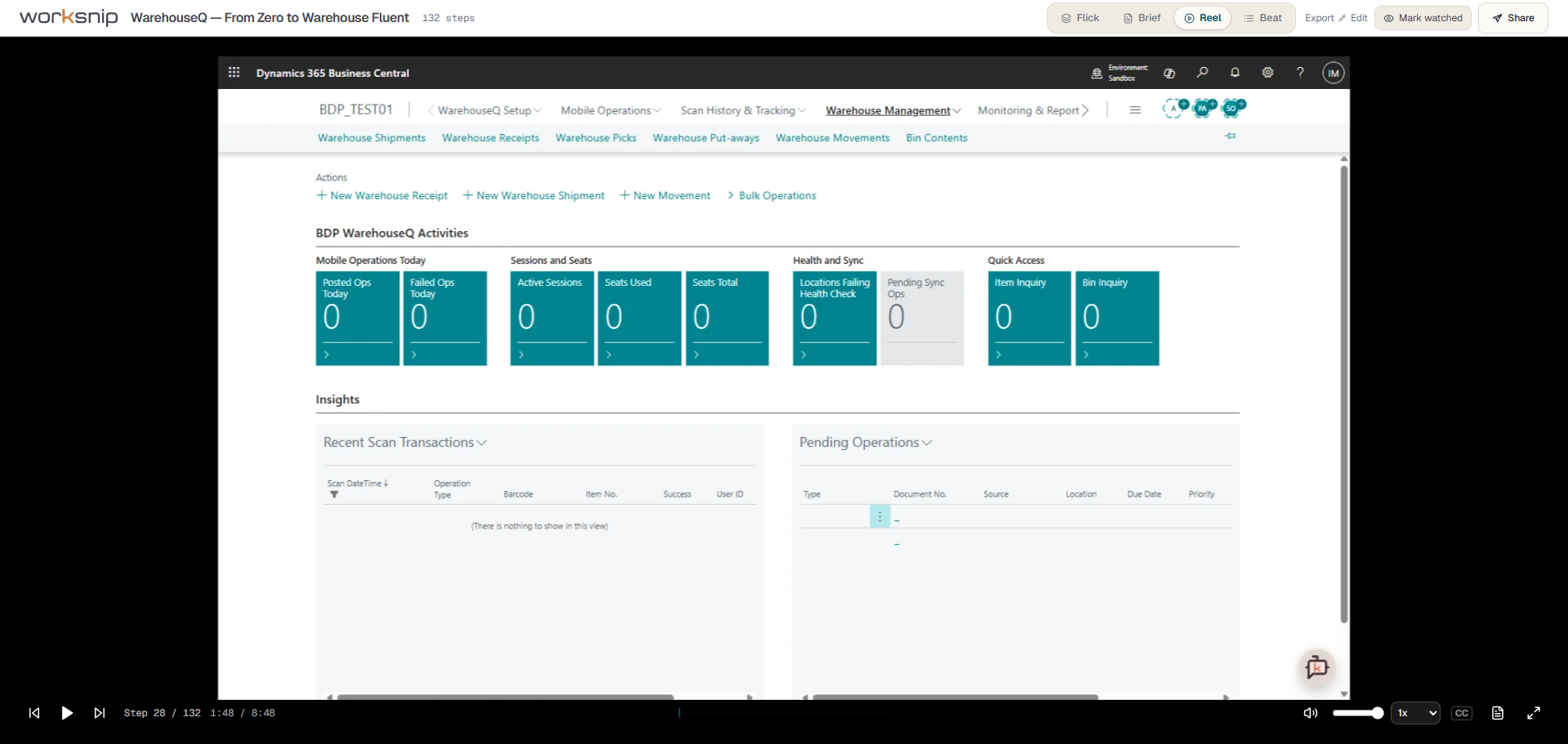
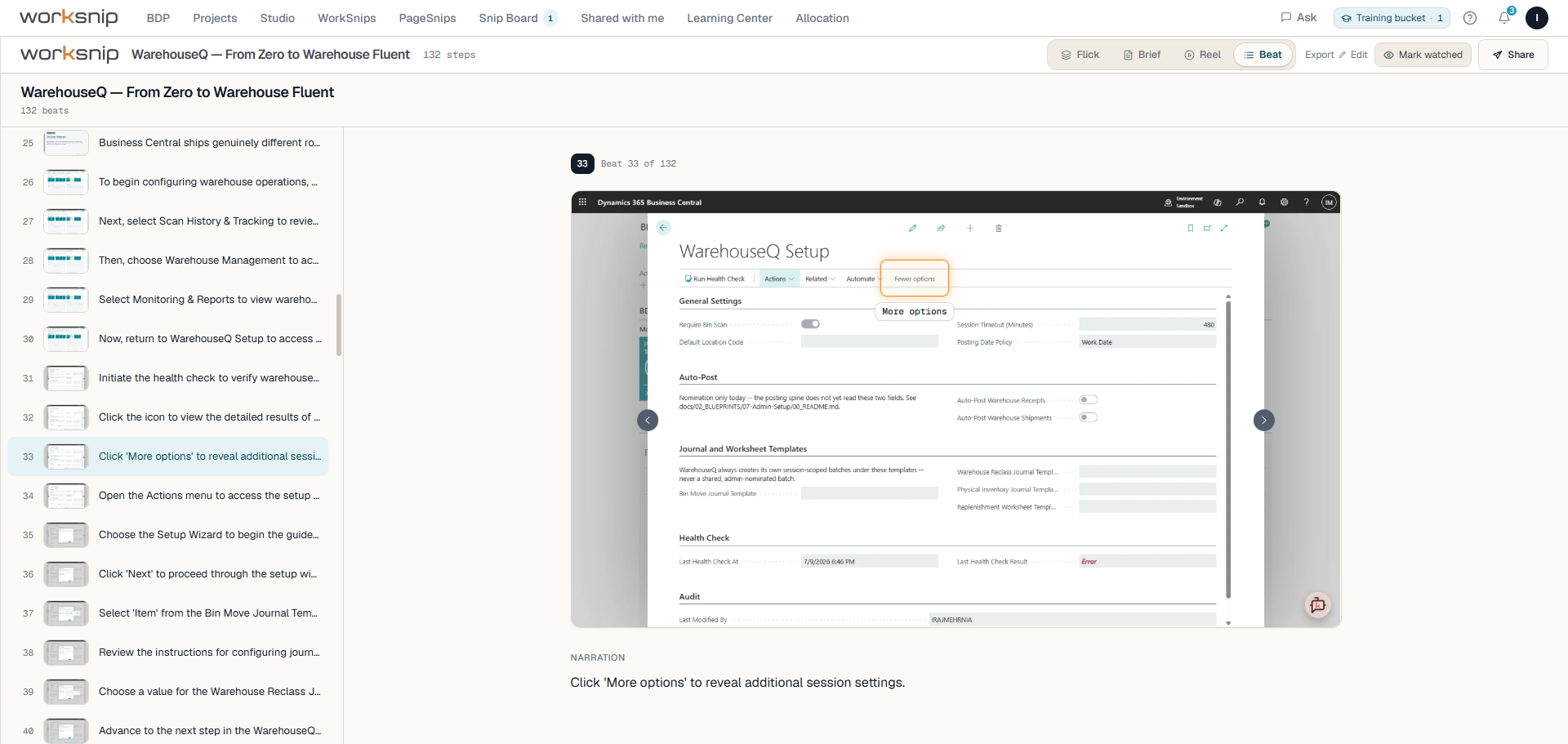
Four ways to read it. One click apart.
Send the same link to a learner, a reader, an observer, and a skimmer. They each land in the layout that fits how they want to absorb it.
The side panel that
actually keeps up.
Most capture tools pop a window that closes the moment you change tabs. worksnip lives in Chrome's official side panel — it rides along through every tab, every dropdown, every iframe.
Switch tabs, follow links, log back in — the recording keeps rolling. No popup that vanishes when your workflow moves.
Iframe-aware coordinates mean the annotation lands on the actual button you clicked — not "somewhere nearby."
Every capture is stored privately over TLS. Blur or redact sensitive regions in the editor before you publish — automatic in-browser redaction is in development.
The panel and the whole app — English, French, Spanish, Danish, or German. Pick yours from the avatar menu; it's remembered next time you sign in.
The studio handles the dull bits.
You handle the point.
Your guides should sound like your team.
Pick a voice from our library, or clone your own from a 30-second sample. Set a default at the org, the project, or the individual guide level — whichever cascade makes sense for your team.
Library voices, five providers
Languages, automatic translation
Sample to clone your own voice
Brief · Medium · Long · Extensive
Comments live next to the step they're about.
Pin threads to individual steps, @-mention teammates, flag a visual issue right on the screen, watch guides for updates, and share three ways: private, your org, or a public link. No more re-explaining in Slack.
- Threads pinned to steps — reviewers comment exactly where it matters.
- Activity timeline — see who watched, finished, or got stuck where.
- Per-email invites with one-click acceptance, plus a request-access flow.
- Export to MP4 / WebM in the browser — no server roundtrip, no waiting.
Not just a capture tool.
Your team's living knowledge base.
Every worksnip you publish joins a searchable company library — threaded, answerable, and trackable. It's where your team asks, learns, and resolves, right where the work actually happens.
A knowledge library for the whole org
Every process you capture lands in one searchable workspace, organized by project. New hires self-serve from day one; your experts stop answering the same question twice.
Threaded snips, pinned to the step
Pin a discussion to any step of any snip, @-mention a teammate, and resolve it in place. The context stays attached to the screen it's about — never lost in a Slack scroll.
A trained Business Central assistant
Ask the assistant — trained on Business Central — and get answers in-thread, grounded in your own guides and Microsoft's docs. It turns your library into something your team can simply talk to.
Visual issue tracking
Capture a screen, mark exactly what's wrong, and thread it through to resolution. Bug reports and "how do I…" tickets everyone can actually see — pointing at the pixel, not describing it.
Assign & track training
Assign a snip or a whole folder to people from My Training, then watch it land — who finished, who's mid-way, and the exact step they dropped off on, from a time-on-step funnel. Onboarding you can prove.
Cohort & client tracking
Group learners into cohorts — a new-hire class, or an entire consulting client — and track completion across the whole engagement in one matrix. Built for teams who train other teams.
$1, $2, or $5 a guide. Bundled into a plan.
Credits are dollar-denominated — 1 credit = $1 — and each guide costs the credits in its bracket: Basic (1, written), Enhanced (2, standard AI voice), or Premium (5, cloned/premium voices + software-aware Business Central narration + the in-thread assistant). Every plan includes a monthly credit bundle, so it stretches further on light guides than on rich ones.
For solo creators writing and voicing their own guides.
≈ 4 Premium · 10 Enhanced · 20 Basic · then $1–$2/guide
- 1 creator seat (full Studio) · collaborators $15/seat · viewers $10/seat (up to 2)
- Capture in Chrome, auto-cleaned screenshots
- Basic (1 credit) — written narration
- Enhanced (2 credits) — standard AI voice, 30+ languages
- 4 reading modes — Flick, Brief, Reel, Beat
- Link share + PDF export
- Up to 10M AI tokens / month
- Premium (5 credits) — voice cloning, software-aware Business Central narration & specialty packs
- Software-aware narration engine
- Threads, branding & advanced export
- Shared workspaces · SSO · audit log
For teams who train, demo, and onboard out loud.
≈ 8 Premium · 20 Enhanced · 40 Basic · then $1–$5/guide
- Everything in Starter, plus:
- 2 creator seats · collaborators $22/seat · viewers $10/seat (up to 8)
- Premium (5 credits) — the feature-rich guide: custom voice cloning + premium voices
- Software-aware narration (Business Central, D365 Sales…) + in-thread KB assistant
- Threaded collaboration — comments, @mentions, activity
- Branded share pages
- Advanced export — MP4 / WebM, no watermark
- Up to 20M AI tokens / month
- Shared workspaces
- SSO & audit log
For org-wide rollouts and shared knowledge bases.
≈ 12 Premium · 30 Enhanced · 60 Basic · then $1–$5/guide
- Everything in Team, plus:
- 3 creator seats · collaborators $29/seat · viewers $10/seat (up to 20)
- Shared workspaces — org-wide knowledge library
- SSO (SAML / OIDC)
- Audit log & roles
- Up to 30M AI tokens / month
- Priority support & onboarding session
- SLA on uptime & response
Unlimited guides & teammates · Custom training pack for your in-house app (≈3 weeks build) · SSO · audit logs · DPA · SOC 2 · dedicated solutions architect.
Things we get asked a lot.
Does this only work for Microsoft Business Central?
Not at all. The capture engine works in any browser-based app — your CRM, your helpdesk, your in-house tool, your portal. We ship two software-aware specialty packs today — Business Central and Dynamics 365 Sales — that ground the narration in Microsoft's own docs; the platform itself is intentionally app-agnostic. NetSuite is the next pack on our roadmap, and Enterprise customers can request a custom pack for their own platform.
What makes this different from Loom or other capture tools?
Two things. First, you don't have to edit anything after — the narration is written for you in plain language and your team's voice. Second, the same capture publishes four ways: a click-through walkthrough, a written brief, an autoplay reel, and a text-only skim. Send one link; the reader picks how to absorb it.
How does the $1 / $2 / $5 pricing work?
1 credit = $1, and each published guide costs the credits in its bracket — Basic (1, written), Enhanced (2, standard AI voice), or Premium (5, cloned/premium voices + software-aware Business Central narration + the in-thread assistant). The bracket is set automatically and you see it before you publish. Every plan bundles a monthly credit allowance — Starter 20, Team 40, Business 60 — so it's a budget, not a flat guide count: 60 credits is ≈ 12 Premium, 30 Enhanced, or 60 Basic guides depending on your mix. Each extra creator seat adds 20 credits. Beyond the bundle, guides bill at the same bracket rate as overage. Drafts and edits don't count; only the first publish does.
How do you handle sensitive data on screen?
Every capture is stored privately over TLS, never public by default. Today, you blur or redact sensitive regions right in the editor before you publish — a permanent, burned-in edit that can't leak into an export. Automatic in-browser redaction (built-in patterns for emails, card numbers, and more, plus your own custom rules) is in development.
Can I export to MP4 or PDF?
MP4 and WebM render directly in your browser — no upload-and-wait dance. PDF export from the Brief mode is on the roadmap; for now Brief prints beautifully from any browser's print dialog.
Is there a team or enterprise plan?
Yes — Team fits most teams ($79/mo, 40 credits ≈ 8 Premium / 20 Enhanced / 40 Basic guides) with software-aware Business Central narration, the in-thread assistant, voice cloning, threads, branding, and advanced export. Business ($199/mo, 60 credits ≈ 12 Premium / 30 Enhanced / 60 Basic) adds shared workspaces, SSO, and an audit log. Enterprise adds custom volumes, a DPA, SOC 2 evidence, and a custom specialty pack built for your platform.
What languages is worksnip available in?
The interface — menus, the avatar menu, notifications — is available in English, French, Spanish, Danish, and German; pick yours from the avatar menu and it's remembered on every sign-in. Guide narration and audio are available in English, French, and Spanish today.
Every guide deserves
better.
Install the side panel in two minutes. Publish your first guide in five.
Pay for what you ship · from $1 a guide · plans from $19/mo.